How To Apply for APAAR ID: Complete Guide After Supreme Court's Opt-Out Ruling
The Supreme Court announced it will direct the CBSE to implement the Orissa High Court's ruling on APAAR IDs pan-India. Model consent forms must include an explicit opt-out option to address data privacy and Aadhaar linkage concerns. That said, scroll below to know what APAAR ID is and how to apply for the same.

- Read in
- हिंदी
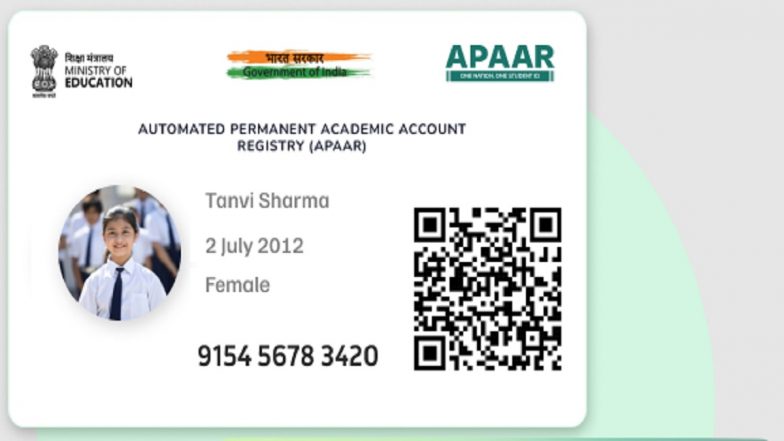
The Supreme Court announced that it will direct the Central Board of Secondary Education (CBSE) to implement a pan-India rollout of the Orissa High Court’s ruling regarding the Automated Permanent Academic Account Registry (APAAR) ID. The directive mandates that model consent forms be amended to explicitly give parents the option to refuse consent or opt out of the system, addressing widespread concerns over data privacy and Aadhaar linkage.
Background and Privacy Concerns
The legal challenge stems from petitions filed by parents questioning the constitutional validity of the APAAR ID scheme, which is framed under the "One Nation, One Student ID" initiative aligned with the National Education Policy (NEP) 2020. How To Download and Set Up the Aadhaar App: Step-by-Step Guide As Downloads Cross 40 Million.
While the central government maintains that the program is entirely voluntary, petitioners argued that because APAAR creation is tied to Aadhaar and requested for school examinations, students are effectively compelled to enrol. Concerns were also raised regarding micro-level data tracking and compliance with the Digital Personal Data Protection (DPDP) Act, 2023. During the hearing, a bench led by Chief Justice of India Surya Kant noted that while the unique academic identifier serves a legitimate purpose for managing student records and tracking educational mobility, the framework must fully respect personal data protections. Consequently, the apex court upheld the necessity of a clear, upfront opt-out mechanism, mirroring the December 2025 Orissa High Court judgment.
What Is an APAAR ID?
The APAAR ID is a unique 12-digit digital identity assigned to students across India. It acts as an academic passport designed to securely store:
- Report cards, marksheets, and degrees
- Credits earned under the National Credit Framework (NCrF)
- Co-curricular achievements, sports records, and scholarships
How To Apply for or Access an APAAR ID
For students and parents choosing to participate in the scheme, the registration and generation process is primarily facilitated through educational institutions or official digital portals:
- School Verification: Parents or adult students must visit their respective schools to verify basic demographic details, ensuring that names match official school records and Aadhaar profiles.
- Consent Submission: Under the updated guidelines, parents will be provided a formal consent form detailing data usage, with explicit options to opt in or refuse consent.
- ID Generation via UDISE+: Upon submission of valid parental consent and authentication via Aadhaar, the school initiates the process through the UDISE+ portal to generate the unique APAAR ID linked to the student's Permanent Education Number (PEN).
- Access via DigiLocker: Once generated, the digital APAAR ID card is automatically pushed to the student's or parent's DigiLocker account. Users can log into DigiLocker or the Academic Bank of Credits (ABC) portal to view, download, or manage their virtual academic identity cards.
As educational institutions prepare to adopt the revised, non-mandatory consent protocols, the Supreme Court's upcoming formal directive ensures that data privacy remains a foundational right for families navigating India's evolving digital education infrastructure.
(The above story first appeared on LatestLY on Jul 21, 2026 03:32 PM IST. For more news and updates on politics, world, sports, entertainment and lifestyle, log on to our website latestly.com).