How To Fill Maharashtra SIR Form Online Before August 8 Extended Deadline
Maharashtra's Special Intensive Revision (SIR) deadline has been extended to August 8, due to monsoon disruptions. Citizens can submit verification forms online via ECI portals or the ECINET app before the final electoral rolls are published in October. The adjustment alters subsequent milestones for the state's electoral roll clean-up, which originally commenced on June 30.

The Election Commission of India (ECI) has extended the ongoing Special Intensive Revision (SIR) of electoral rolls in Maharashtra by 10 days, pushing the final date for household verification and enumeration form collection to August 8. The deadline extension follows appeals from the Maharashtra State Electoral Office, citing disruptions caused by heavy monsoon rains in Mumbai and the Konkan region, alongside administrative commitments toward the Ashadhi Vaari pilgrimage. With the window extended, residents now have additional time to ensure their details are correctly registered or updated online.
Revised Timeline for the SIR Drive in Maharashtra
The adjustment alters subsequent milestones for the state's electoral roll clean-up, which originally commenced on June 30. How To Check if Your BLO Has Uploaded Your Enumeration Form on ECI Portal.
- House-to-House Verification by BLOs: Extended until August 8.
- Publication of Draft Electoral Rolls: August 17.
- Period for Claims and Objections: August 17 to September 16.
- Final Publication of Electoral Rolls: October 19.
How To Complete the SIR Form Online
While Booth Level Officers (BLOs) are conducting physical house visits, citizens can also verify and submit information online through official ECI portals. Digital submission helps fast-track verification, though physical verification by a BLO remains a mandatory administrative step.
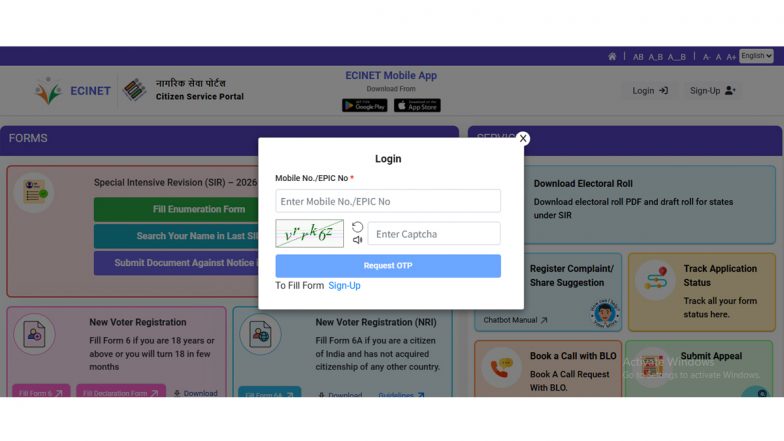
- Visit the Portal: Go to the official voter service portal at voters.eci.gov.in or use the designated ECINET mobile application.
- Log in or Register: Log in using your credentials or sign up with your mobile number.
- Verify Existing Data: Select the option to search your name or your family's details in the electoral database, specifically checking records from past revisions.
- Fill Out the Enumeration Form: Access the pre-filled SIR enumeration form. Ensure that personal details, residential addresses, and family mapping correspond accurately with official records.
- Upload Supporting Documents: Attach necessary verification documents—such as a birth certificate, passport, Class 10 board certificate, Aadhaar card, or government-issued identity proof.
- Submit and Track: Submit the form online. Make sure to keep a digital or printed acknowledgement for your records to show the visiting BLO. How To Submit Your SIR Enumeration Form Online.
Important Guidelines for Citizens
Civic authorities have urged residents not to wait until the final deadline. Although citizens can fill out forms online, officials emphasise that the physical home visit by the BLO is required to authenticate documents and verify residential status. Citizens can utilise the "Book a Call" feature on the ECINET application to coordinate a convenient visit time with their local BLO, ensuring seamless inclusion ahead of the August 8 cutoff.
(The above story first appeared on LatestLY on Jul 25, 2026 08:09 PM IST. For more news and updates on politics, world, sports, entertainment and lifestyle, log on to our website latestly.com).