Maharashtra SIR Revision: How To File Your Enumeration Form Online via ECI Portal
The ECI’s Special Intensive Revision (SIR) in Maharashtra aims to verify voter rolls. Citizens can submit Enumeration Forms via the Voter Service Portal at voters.eci.gov.in or their local Booth Level Officer (BLO). The online process requires your EPIC number and Aadhaar for verification. Scroll below to know more.

- Read in
- हिंदी
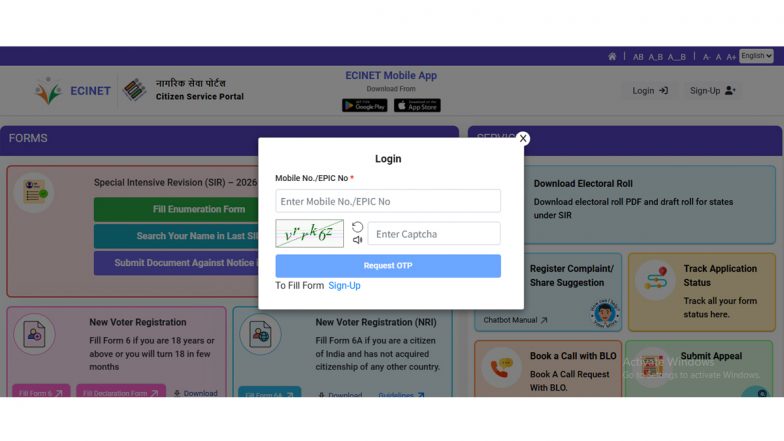
As the Election Commission of India (ECI) continues its Special Intensive Revision (SIR) exercise across various states, including Maharashtra, many citizens are looking to verify their details or update their status in the electoral rolls. The SIR is a significant administrative effort aimed at ensuring that voter lists are accurate by verifying existing data and eliminating inaccuracies.
While Booth Level Officers (BLOs) conduct house-to-house visits, the Election Commission has provided an online mechanism for citizens, particularly urban residents and temporary migrants, to submit their Enumeration Forms (EF) digitally. How To Check if Your BLO Has Uploaded Your Enumeration Form on ECI Portal.
What Is the SIR Form?
The SIR form, often referred to as the Enumeration Form, is not a standard application for new registration, but a tool used during the revision process to link current electors with historical electoral data. The objective is to match a voter's current details with records from the last major revision - historically identified as the 2002–2004 period - to ensure the integrity of the voter list.
Prerequisites for Online Submission
Before beginning the process on the official Voter Service Portal at voters.eci.gov.in, ensure you have the following ready to ensure a smooth submission:
- Active EPIC Number: Your 12-digit Voter ID number.
- Linked Mobile Number: Your mobile number must be linked to your EPIC to receive the mandatory One-Time Password (OTP).
- Aadhaar Integration: Your name on your Aadhaar card should exactly match the name on your Voter ID to facilitate the mandatory Aadhaar E-sign process.
Step-by-Step Guide To Submit SIR Form Online
- Access the Portal: Visit the Election Commission’s Citizen Service Portal at voters.eci.gov.in and navigate to the SIR section.
- Login and Selection: Log in using your credentials. Select your state (Maharashtra) from the dropdown menu to view relevant regional data.
- Search EPIC: Enter your EPIC number and click "Search" to view your pre-filled details.
- OTP Verification: Once you confirm your details, an OTP will be sent to your linked mobile number. Complete the verification to proceed.
- Select Category: Choose the option that best applies to your situation - whether your name or your relative's name exists in the historical electoral records (last SIR).
- Aadhaar E-sign: The portal will redirect you to an Aadhaar E-sign page. Enter your Aadhaar number and verify it using the OTP sent to your Aadhaar-linked mobile number.
- Final Review and Submission: Preview your form to ensure all information is accurate. Once verified, click "Submit". A confirmation receipt will be generated; it is recommended to download and save this for your records.
Important Considerations
If your name cannot be matched with historical records, the system may require further documentation or a hearing with your local Electoral Registration Officer (ERO). If you encounter difficulties, the ECI’s toll-free helpline, 1950, remains the primary point of contact for resolving queries related to the revision process. How To Submit Your SIR Enumeration Form Online.
For those who do not meet the criteria for online submission or face technical hurdles, the offline route remains available: you may submit your forms directly to your assigned Booth Level Officer (BLO) during their scheduled visits to your locality.
(The above story first appeared on LatestLY on Jul 19, 2026 12:16 PM IST. For more news and updates on politics, world, sports, entertainment and lifestyle, log on to our website latestly.com).