EPFO Passbook: How To Check Your Monthly PF Contributions and Balance Online
EPFO members can check monthly PF contributions and balances using the online Member Passbook portal at passbook.epfindia.gov.in, the UMANG mobile app, or quick offline services via a missed call or SMS using their active UAN. Ensure UAN is active and properly seeded with mandatory KYC details, including Aadhaar, PAN and a verified bank account.

Monitoring employee provident fund accounts is essential to ensure that employers deposit monthly salary deductions correctly. The Employees' Provident Fund Organisation (EPFO) provides multiple digital and offline channels for salaried individuals to verify whether their monthly PF contributions have been successfully credited.
Using the EPFO Member Passbook Portal
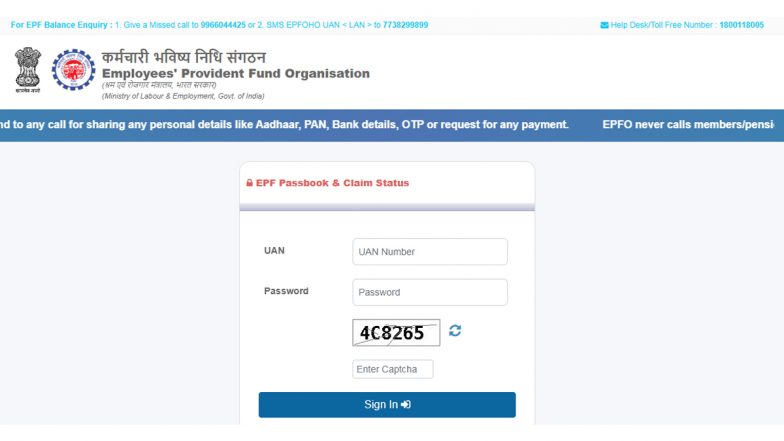
The most detailed method to track monthly contributions is through the official EPFO Member Passbook portal. Account holders can visit the official passbook website at passbook.epfindia.gov.in and log in using their activated Universal Account Number (UAN) and password. EPFO Passbook: EPF Interest Not Showing? Check PF Balance in 3 Easy Ways.
Once logged in, selecting the relevant Member ID displays a comprehensive ledger of monthly deposits made by both the employee and the employer, alongside any accrued interest.
Checking Balance and Deposits via the UMANG App
For smartphone users, the government-backed UMANG (Unified Mobile Application for New-age Governance) app offers a streamlined option to review PF records. Users can search for the "EPFO" service within the app, navigate to employee-centric features, and select "View Passbook." Accessing the records requires entering the UAN followed by a One-Time Password (OTP) sent to the registered mobile number.
Offline and Quick Verification Methods
For individuals seeking immediate updates without logging into online portals, EPFO facilitates quick balance and contribution checks via SMS and missed calls.
- Missed Call Service: Registered members can give a missed call to 9966044425 from their UAN-linked mobile number. The call disconnects automatically, and the user receives an SMS containing the latest balance and the most recent contribution details.
- SMS Service: Members can send an SMS in the format EPFOHO UAN to 7738299899 from their registered mobile number to receive contribution updates. EPFO 3.0: Centralised Database, UPI Withdrawals and Faster Claim Settlements Explained.
To utilise these quick mobile services, the UAN must be active and properly seeded with mandatory KYC details, including Aadhaar, PAN, and a verified bank account.
(The above story first appeared on LatestLY on Sep 02, 2026 08:57 PM IST. For more news and updates on politics, world, sports, entertainment and lifestyle, log on to our website latestly.com).