How To Delete Facebook Account Temporarily or Permanently or Without Password? Check Step-by-Step Guide
Check out the steps on how to delete your account on on how to delete Facebook account temporarily, permanently or without need any login credentials. Ceh


Mumbai, September 30: If you are thinking of permanently or temporarily deleting your Facebook account, you must be aware of the step-by-step procedure on how to do it. Along with knowing how to delete a Facebook account, you need to know the steps to recover it in case you need it back. By deleting your FB account, you can lose all the information, including your profile pictures, photos, videos and all the other details.
There are different ways to remove your Facebook account, such as deleting it from all devices or deactivating it. Once you delete your account, you cannot regain its access after a period. On the other hand, if you deactivate your account, you can log back in and access it whenever you want. In this article, we will explain step-by-step instructions on deleting or deactivating your Facebook account. WhatsApp New Feature Update: Meta-Owned Messaging Platform To Enhance Link Searching, User Safety Features in Latest Beta Update; Check Details.
How To Delete a Facebook Account Permanently?
By deleting your FB account permanently, you may lose all the details and will not be able to retrieve any of them later on. If you have more than one Facebook profile, you can also delete them all under your account. However, you need to understand that after taking this step, you will not be able to access Facebook Messenger, Meta Quest (if you used your FB credentials) and all the services that you used its login ID to subscribe such as Pinterest, Spotify or any other services. Here are the steps on how to delete your Facebook account permanently.
Step 1
Step 2
Step 3
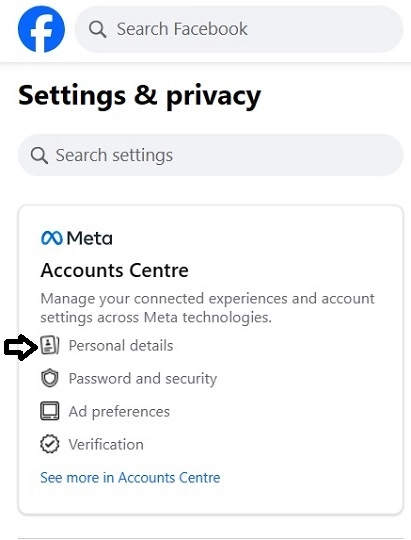
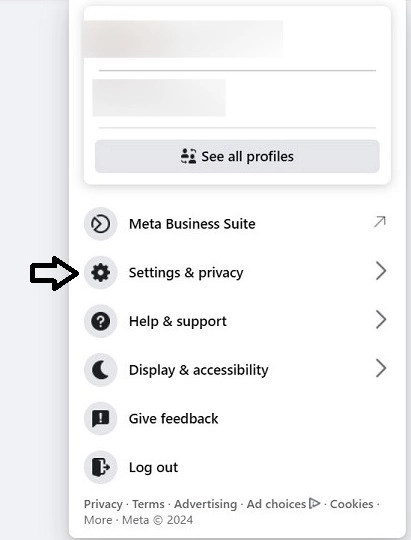
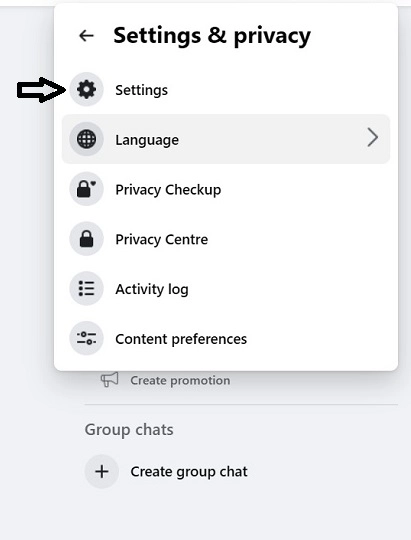
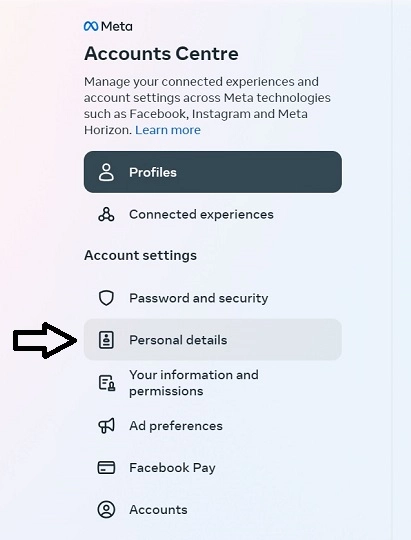
First, you need to go to your Profile in the top-right corner and click to expand the list of options from the dropdown menu. Now, select "Setting and Privacy" and click the "Setting" option from the menu. It will open several options on your screen, find "Account Centre" and click on it or click "see more in Account Centre". It will have selected your "Profile" tab by default. Now, click on "Personal Details" Under Account Settings.
Step 4
Step 5
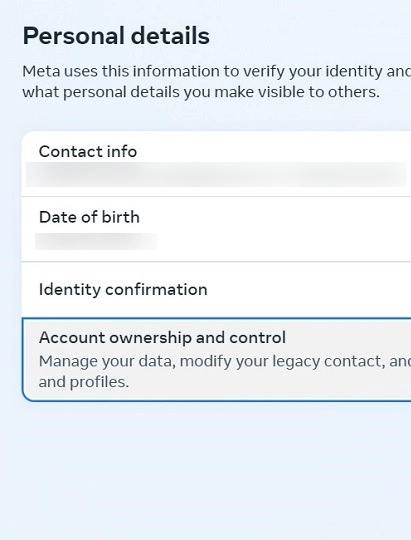
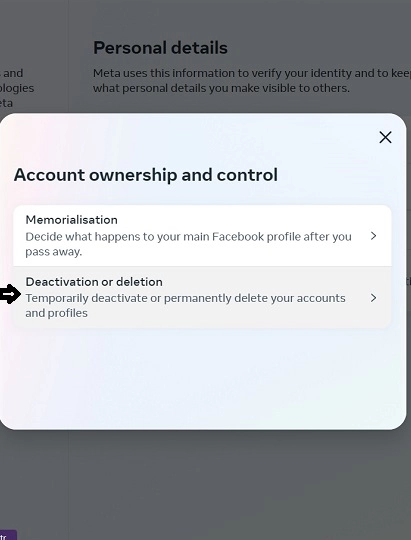
It will show your details, including Contact info, Date of Birth, and Identity information, but you have to click on the "Account ownership and control" option. Then, click on the "Deactivation or deletion" option and click on your Facebook profile or account. After that, click on "Delete Account" and "Continue to account deletion". Click on the "Delete Account" again, enter the password, and click "Continue". Your Facebook account will be permanently deleted.
Step 6
Step 7
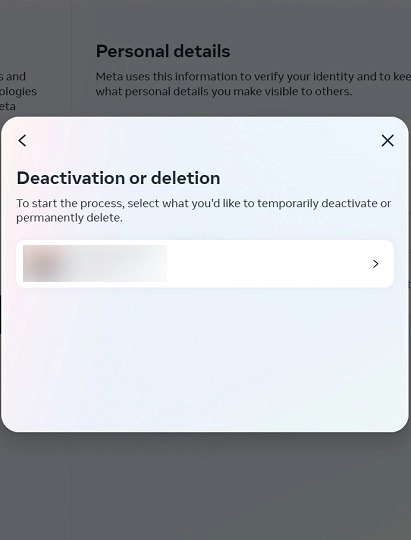
If you do not want to Facebook account without going to the Account Centre, please follow these steps: Click on Profile > Settings and Privacy > Setting > Your Facebook information > Deactivation and deletion > Delete account > Continue to account deletion > Delete account > Continue. You can cancel your FB account deletion in less than 30 days, as after that, all the details will be erased. Within 90 days, all the things you posted will be deleted.
How To Delete a Facebook Account on an Android Phone?
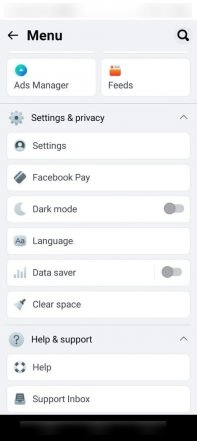
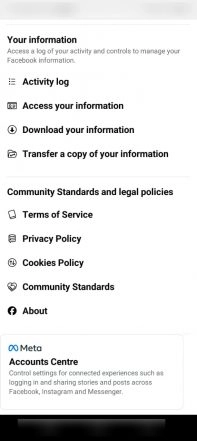
To delete your FB account on an Android phone, you need to tap on the three vertical lines in the top right corner of the app. After that, tap on Settings and Privacy > See more in Account Centre > Personal Details > Account Ownership and control > Deactivation or deletion > select profile > Delete account. To confirm, tap on Continue.
Step 1
Step 2
How To Delete a Facebook Account Temporarily?
You can also temporarily delete your account, which you can later recover and use again. In the meantime, people will not be able to see your "timeline" or search for you. To deactivate your account temporarily, please go to your profile in the top right corner of Facebook on your computer. Then, click on Settings and Privacy > Settings > Account Centre > Personal Details > Account Settings > Account ownership and control > Deactivation or deletion > Deactivate account > Continue.
How To Delete a Facebook Account Without Login or Password?
To delete your FB account without login or password, you need to contact Facebook's Support team. Follow the steps and access the "Deactivation or deletion" of your account option under Account ownership and control. Then, select the account that you want to remove. Click on "Get More Help" and fill out a form with any information about your account that you can remember.
You can also take your friend's help to get your account deleted. Just enter your friend's details on the account recovery page, ask him to answer a security question, and after logging into FB, your friend can delete your account through the settings page. TikTok Parent Firm ByteDance Plans New AI Model Trained With Huawei Chips: Report.
How To Delete a Facebook Account from Instagram
You can unlink your Facebook account from Instagram by following the simple steps. First, go to the settings option (three vertical lines) on your profile page. Now, tap on Account Center > Accounts > Remove > Remove account > Continue. To confirm your action, tap on "Yes, Continue".
(The above story first appeared on LatestLY on Oct 01, 2024 10:00 AM IST. For more news and updates on politics, world, sports, entertainment and lifestyle, log on to our website latestly.com).