Step-by-Step Guide To Verify Your SIR Enumeration Status Online at voters.eci.gov.in
Citizens can verify their Special Intensive Revision (SIR) enumeration form status online via the ECI portal at voters.eci.gov.in. By logging in, entering their EPIC number, and checking the form section, users can confirm if their BLO has successfully updated their records. Scroll below to know more.

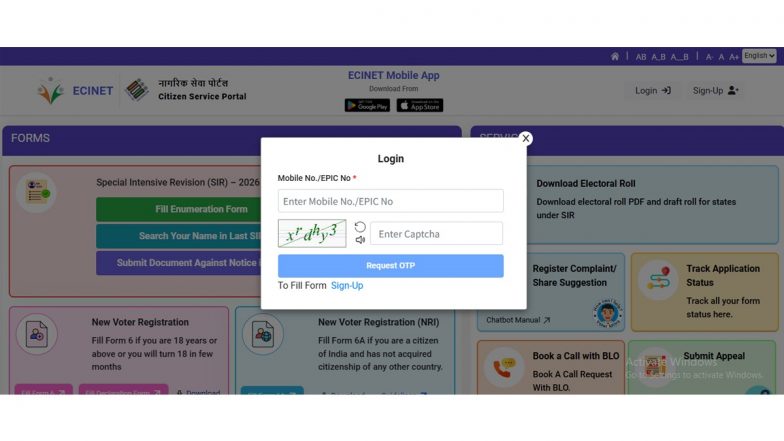
Ensuring that your voter information is accurately updated is a critical step in maintaining a transparent electoral process. During voter list updates and revision exercises, such as the Special Intensive Revision (SIR), Booth Level Officers (BLO) collect and upload field data, including household enumeration forms. To help citizens verify whether their local official has successfully logged their details into the system, the Election Commission of India (ECI) provides a direct verification mechanism through its official portal at voters.eci.gov.in.
Accessing the ECI Voters' Service Portal
The primary digital gateway for checking enumeration status is the official ECI portal. Citizens can perform the verification check entirely online by following a few structured steps. Maharashtra SIR Revision: How To File Your Enumeration Form Online via ECI Portal.
- Open a web browser and navigate to the official Voters' Service Portal at voters.eci.gov.in.
- On the homepage, locate and click on the option designated for Fill Enumeration Form.
- If you are a first-time user on this specific interface, complete a quick registration by clicking Sign Up, entering your mobile number, and completing the captcha.
- Existing users can directly select Login, input their registered mobile number, submit the captcha, and authenticate via the One-Time Password (OTP) sent to their phone.
Searching and Confirming Your Status on ECI Portal
Once successfully logged into the dashboard, your profile name will appear at the top of the window, confirming your session is active.
- Click on the Fill Enumeration Form option again to proceed to the lookup tool.
- Select your respective state and enter your unique EPIC (Voter ID) number into the designated search field.
- Click the Search button to instantly query the database regarding your submission status.
Interpreting the Results and Next Steps
The system will instantly display the real-time processing status linked to your credentials.
- Successful Upload: If your local BLO has correctly processed and digitised your paperwork, a prompt will appear stating, "Your form has already been submitted with mobile number [XXX]." This confirms that your records are up to date.
- Pending or Missing Data: If the system does not show a submission confirmation and instead opens a fresh form layout - or if an unfamiliar mobile number appears - it indicates that the record has not been formally updated. How To Submit Your SIR Enumeration Form Online.
In the event of discrepancies or missing entries, citizens are advised to reach out immediately to their designated local BLO or contact the national voter helpline at 1950 for rectification.
(The above story first appeared on LatestLY on Jul 29, 2026 07:46 PM IST. For more news and updates on politics, world, sports, entertainment and lifestyle, log on to our website latestly.com).