How To Update Mobile Number on Driving Licence Online: A Step-by-Step Guide
The Ministry of Road Transport and Highways (MoRTH) now allows drivers to update their linked mobile numbers online via the Vahan (for RC) and Sarathi (for DL) portals. This service replaces the need for RTO visits, using secure OTP verification to ensure users receive timely transport alerts, renewal notifications, and access to essential government services.

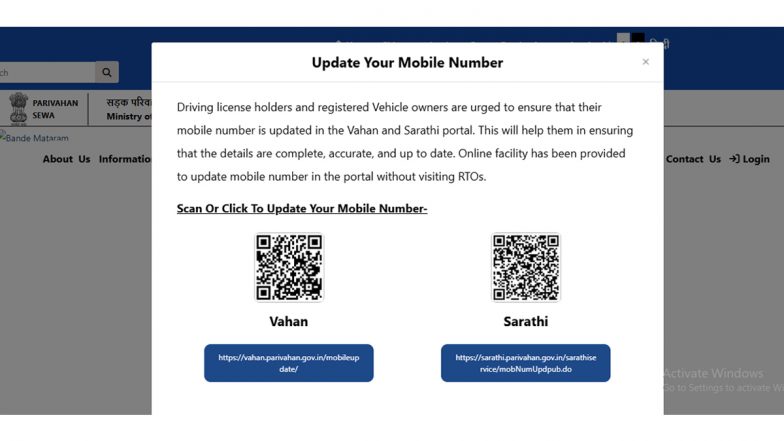
Maintaining an updated mobile number with the Ministry of Road Transport and Highways (MoRTH) is essential for every vehicle owner and licensed driver. A registered mobile number ensures that citizens receive critical transport notifications, automated alerts for document renewals, and the one-time passwords (OTPs) required for accessing various digital services.
To streamline this, MoRTH now permits users to update their contact details online via the Vahan and Sarathi portals, effectively removing the need for a physical visit to a Regional Transport Office (RTO). Hyderabad BMW Number Plate Scam: Driver Caught Using High-Tech Device To Evade Traffic Challans During Night Police Check (Watch Video).
Understanding the Digital Portal System
The transport ministry has bifurcated its online services to manage data more efficiently. Users should navigate to the appropriate portal depending on the specific document they wish to update:
- Sarathi Portal: This platform is dedicated to services related to Driving Licences (DL).
- Vahan Portal: This platform is designated for Vehicle Registration Certificate (RC) updates.
By providing these services online, the ministry aims to enhance the "ease of living" for citizens by allowing for secure, OTP-based verification that can be completed from any location.
Step-by-Step Guide to Updating Your Details
The online update process is designed to be user-friendly. To change your registered mobile number, follow these steps:
- Access the Official Portal: Visit the official Parivahan Sewa website at parivahan.gov.in. Choose either the Sarathi or Vahan portal based on whether you are updating your licence or vehicle registration details.
- Select the Service: Navigate to the "Mobile Number Update" option within the relevant service menu.
- Enter Identification Data: Input the required details, such as your Driving Licence number or Vehicle Registration number. You may also be asked for verification data, such as your date of birth.
- Identity Verification: Depending on your state's current integration and your existing records, the system may send an OTP to your old registered mobile number. If the old number is no longer accessible, follow the specific state-level instructions provided on the portal for alternative verification.
- Submit New Number: Once the initial identity check is successful, enter your new mobile number. Verify this new number by entering the OTP sent to it, then click "Submit" to finalise the request. What Is ‘RTO E-Challan’ APK Scam? Fake File Circulating on WhatsApp May Hack Your Mobile Phone, How To Stay Safe.
Importance of Keeping Records Updated
Ensuring that transport authorities have your current contact information is more than an administrative formality. Real-time updates help vehicle owners stay informed about permit expirations, insurance reminders, and mandatory document updates. Furthermore, digital access is increasingly becoming the standard for government services. Keeping your mobile number current guarantees seamless access to these systems and prevents potential complications when trying to use online services in the future. Users are advised to utilise only the official government domains to perform these updates to ensure their personal information remains secure.
(The above story first appeared on LatestLY on Jul 18, 2026 05:52 PM IST. For more news and updates on politics, world, sports, entertainment and lifestyle, log on to our website latestly.com).