WhatsApp Web Calling Launched: Users Can Now Make Audio, Video Calls Directly From Browser
Meta has announced a major upgrade to WhatsApp Web, allowing users to make and receive audio and video calls directly inside their web browsers without downloading a desktop application.

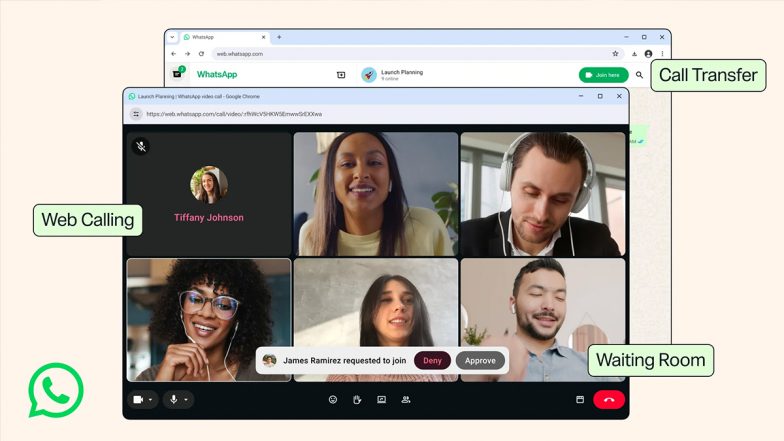
Meta has announced a major upgrade to WhatsApp Web, allowing users to make and receive audio and video calls directly inside their web browsers without downloading a desktop application. The feature, officially launched on July 28, 2026, aims to streamline communication across personal and professional environments, giving users parity with standalone desktop and mobile apps.
Native Calling Comes Directly to the Web Browser
The new update enables both one-on-one and group voice and video calling directly from WhatsApp Web. Designed specifically for users on shared computers, locked-down work laptops, or secondary devices where installing software is restricted, the feature operates entirely within standard desktop browsers. How To Edit PDFs in WhatsApp: Step-by-Step Guide.
Despite running in a browser tab, web calls retain essential productivity tools, including real-time screen sharing, emoji reactions, and a dedicated Calls tab featuring full call history and favorite contacts. Meta confirmed that all browser-based calls remain end-to-end encrypted, free of charge, and subject to no time limits.
Seamless Device Transfers and Host Controls
Alongside web calling, WhatsApp introduced a Call Transfer capability. The feature allows active group calls to be shifted between mobile devices, tablets, and web or desktop interfaces in real time without dropping the connection—enabling users to start a call on the go and continue on a larger monitor upon arriving at their desk.
To assist hosts with meeting management, WhatsApp also launched a Waiting Room feature. When creators share a call link with "Require approval to join" toggled on, incoming participants are placed in a queue until the host grants admission, providing tighter security and access control for group sessions. Are WhatsApp Users at Risk? Here's What CERT-In Advised to Keep Your Account Safe.
'47 Chrome Tabs Finally Get A Purpose'
WhatsApp calls now work in your browser. Your 47 open Chrome tabs finally got company that's actually useful. pic.twitter.com/TRRqW9bvRV
— Kunal Shah (@kunalb11) July 28, 2026
Technical Upgrades: Noise Suppression and QuickHD
To improve overall call quality across varied hardware environments, Meta released two performance-focused enhancements:
-
QuickHD: Optimizes video rendering during the initial seconds of a connection, ensuring crisp high-definition video from the moment a call starts.
-
Noise Suppression: Integrates background noise reduction software to filter out ambient sound in noisy environments. The setting can be toggled directly inside the call menu.
Leadership Perspective and Global Impact
The addition of browser-native calling strengthens WhatsApp's position as a unified communication platform across mobile and desktop interfaces, narrowing the usability gap with established desktop conferencing tools.
Highlighting the practical utility of the update, Kunal Shah, the Global Head of WhatsApp and founder of CRED, commented on X (formerly Twitter): "WhatsApp calls now work in your browser. Your 47 open Chrome tabs finally got company that's actually useful."
Meta confirmed that web calling, call transfers, waiting rooms, and enhanced audio features are currently rolling out globally and will become accessible to all users over the coming weeks.
(The above story first appeared on LatestLY on Jul 28, 2026 09:12 PM IST. For more news and updates on politics, world, sports, entertainment and lifestyle, log on to our website latestly.com).