Google Launches Dedicated Windows App with Global Search and AI Integration
Google has launched its official Windows desktop app, featuring a global search bar accessible via Alt + Space and an integrated AI Mode for conversational queries. The app combines web search with local file and Google Drive retrieval, while also introducing Google Lens for on-screen object and text identification.

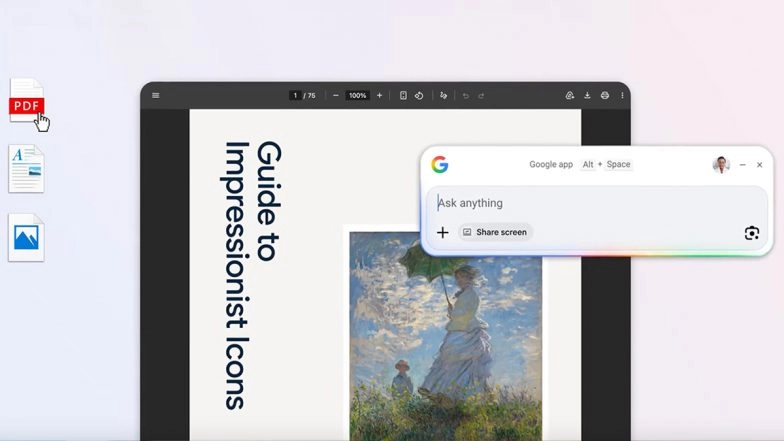
Google has officially released its first dedicated Search app for Windows PCs, bringing its AI-powered capabilities and global search tools directly to the desktop. The application is designed to function as a unified hub, allowing users to retrieve information from the web, locate local system files, and access Google Drive documents through a single interface. By moving these features out of the browser and into the operating system, Google aims to streamline multitasking and reduce the need for constant tab-switching.
The rollout is currently available for English-language users, with Google indicating plans for further linguistic expansion in the coming months. The app focuses on deep system integration to make digital retrieval more intuitive for professional and casual users alike. Microsoft Outlook Lite App for Android To Shut Down on May 25, Company Urges Users To Migrate to Standard Outlook Mobile App.
Unified Search and AI-Powered Assistance
The centerpiece of the new desktop experience is a global search bar that can be summoned instantly using the Alt + Space keyboard shortcut. This command opens a quick-access box that scans the web, installed applications, and local storage simultaneously. By indexing Google Drive alongside local files, the app provides a consolidated view of a user's entire digital library.
A dedicated "AI Mode" is also integrated into the application. This feature allows users to pose complex questions and receive detailed, conversational responses. Unlike standard web searches, the AI Mode synthesises information and provides direct answers accompanied by relevant web citations, functioning similarly to the Gemini interface.
Multitasking and Screen-Aware Tools
To assist with productivity, the Google app introduces features designed to interact with a user’s active workspace. A new screen-sharing option allows the app to "see" a selected window or the entire desktop. This enables users to ask contextual questions about the documents or websites they are currently viewing without leaving their primary task.
Google has also brought its Lens technology to the Windows environment. This allows users to select any text or image visible on their monitor to perform instant translations, identify objects, or solve academic queries. This functionality mimics the "Circle to Search" feature found on mobile devices, adapted for a mouse-and-keyboard setup.
Technical Integration and Workflow Efficiency
Google stated that the primary goal of the Windows app is to lower the friction associated with information retrieval. By providing a persistent interface that sits above other applications, the software allows users to get help with homework, translate work documents, or find specific files without breaking their creative or professional workflow. Google To Penalise Websites for ‘Back Button Hijacking’ Starting June 15.
The app’s architecture is designed to be lightweight, ensuring that the global search and AI features remain responsive even when the system is under heavy load from other software. Google’s move into the desktop application space follows a broader industry trend of integrating "agentic" AI tools directly into operating systems to assist with multi-step digital tasks.
(The above story first appeared on LatestLY on Apr 15, 2026 03:50 PM IST. For more news and updates on politics, world, sports, entertainment and lifestyle, log on to our website latestly.com).