Why Vector Graphic Design Skills Are Growing in Demand Worldwide
There are a few key reasons why vector graphic design has taken the world by storm in recent years.

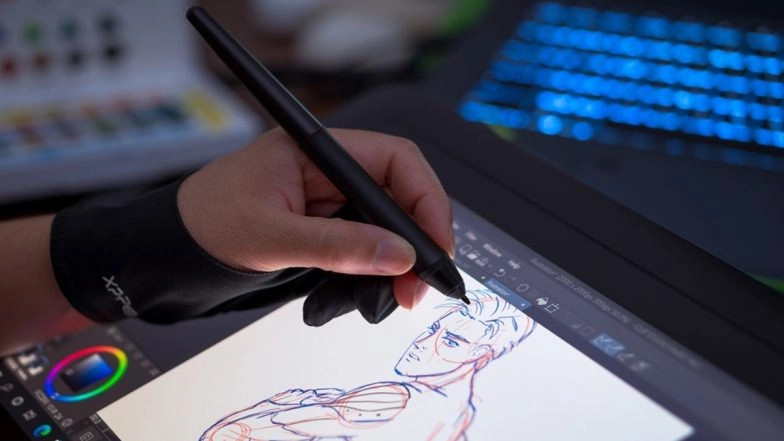
There are a few key reasons why vector graphic design has taken the world by storm in recent years. With the global eCommerce boom inspiring a rise in digital marketing services, more industries are integrating vector graphics into their daily promotional and campaign management workflows. Vector image files are being sent like PDFs, as they’re universally compatible with all devices, and can be resized without affecting image quality and resolution – like a .zip file but for photos and graphics.
But .svg vector image files aren’t your regular old .jpg file types. You can’t edit your vector image files the same way you would a screenshot. Instead, vector image files require unique tools like Adobe Illustrator, Adobe’s signature vector graphics software that also happens to be the global industry standard. With Adobe Illustrator’s student discount, this industry-leading tool is also accessible for young professionals looking to hone their vector graphics skills.
Alongside mastering Illustrator and other industry tools, aspiring vector artists must also find their own niche within the wider landscape of vector graphic design projects. Today, we’ll be highlighting just some of the top tools and applications of vector graphic design skills, illuminating just how versatile vector graphic design can be, and spotlighting all the key reasons why demand for these skills have skyrocketed in recent years.
Key applications of vector graphic design skills today
The .svg (Scalable Vector Graphics) file type was originally developed at the turn of the 21st century as a web-friendly image format. SVG files were specifically developed to be text-based file format as this allowed HTML coders to use vector graphics in web design. The text-based file format was also recognised for allowing for easier file compression and scalability when compared to raster images.
Although SVG files are still used by web developers today, the rise of digital technologies has made vector image files a valuable format for other disciplines and processes. We’ve included just a few examples below.
Developing versatile marketing materials
Marketers today are tasked with applying the same graphics (i.e. brand logos, icons, and other branded design elements) across different types of media. From email marketing and web portals to posters, business cards, and watermarks, brand image assets are used to provide cohesion between all the many physical and digital marketing elements developed across a campaign.
For aspiring marketers, building proficiency with vector graphic design can help ensure professionals are capable of handling vector images across different digital platforms, and of making quick changes to vector files wherever they may be needed. As marketers work across brand bibles in any given campaign, confidence with using vector graphics can also make developing mood boards and look books a lot easier.
Supporting brand consistency and identity
As vector image files can be scaled up and down without impacting image resolution, formatting digital designs as .svg files is paramount to producing a robust web- and print-ready brand bible.
Vector image graphics can also accommodate transparent image backgrounds, which are essential for overlaying icons and logos onto larger designs. If you've ever accidentally uploaded a logo with a white square background onto the header of a webpage, then you'll definitely have built an appreciation for transparent vector image files.
Facilitating UX/UI design projects
Speaking of icons and logos on webpages, one clearcut sign of a thoughtful user interface (UI), is the inclusion of custom, branded icons that are visually engaging but also easy to interpret. The art of designing branded icons requires graphic designers to develop a strong understanding of the laws of UX, engaging with the psychological connections that human users make between different shapes, pathways, and information flows.
Vector graphic design works into this equation by supporting graphic designers in building icons that can be seamlessly integrated into a UI design platform, like Adobe XD and Figma. With UI-ready designs, vector graphic designers can helm UX and UI projects across all industries.
Supporting growing vector applications across industries
And finally, as all industries can benefit from vector-based design projects, working in vector graphic design can provide a wide variety of professional opportunities. For designers looking to build up a varied and eclectic portfolio, working across vector-based design projects can provide the variety you're looking for in your day to day professional life.
Similarly, employers also look for this versatility from vector graphic designers in particular, recognising that designing hero images or editorial images is entirely different to creating bespoke icons and logos. In searching for this more specialised design skill set, graphic designers that specifically showcase their vector design skills can set themselves up for an illustrious career as a vector designer.

Top tools for vector graphic design projects
If a career in vector graphic design sounds like the right fit for you, then be sure to familiarise yourself with some of the following industry standard vector design tools we've outlined below.
Adobe Illustrator
Adobe Illustrator is the global gold standard in vector graphics software, and is used by designers worldwide for creating scalable, high-resolution vector graphics and designs. Adobe's familiar UI makes Illustrator a widely recognised skill set on graphic design CVs.
Being part of Adobe's Creative Cloud suite, Illustrator also has Adobe Firefly integration that provides advanced AI editing and generative tools. As Firefly integration is still relatively new, the next generation of graphic designers can gain familiarity with these tools while they're still on the ground floor.
Affinity Designer 2
A popular alternative to Illustrator, Affinity Designer 2 offers a one-time purchase model, which makes it a fan favourite of student designers. The platform UI also allows for seamless live switching between raster and vector workspaces, ensuring designers can work with agility.
With its 8,000-step undo history and advanced tools like Shape Builder and Vector Warp, Affinity Designer 2 has a unique yet familiar interface which provides novel features and use cases for designers who are ready to put in the time to master the platform.
CorelDRAW Graphics Suite
With precise vector tools and some AI-powered features like LiveSketch, CorelDRAW Graphics Suite is a highly versatile vector design tool that accommodates both traditional pen to paper illustrators as well as vector- and even code-based designers working with Boolean path operations, and node editing.
CorelDRAW Graphics Suite offers both subscription and perpetual licensing options, making it another versatile software investment for vector graphic designers.
Inkscape
A free, open source vector graphics editor, Inkscape offers industry-grade tools for icon and logo design and even technical drawings at zero cost. This makes Inkscape a great choice for entry level graphic designers looking to add some software skills to their CVs.
Inkscape also runs on Windows, Linux, and macOS, with strong support for importing and exporting a variety of file formats, including .svg, .ai, and .pdf.
Kittl
A browser-based design tool with a built-in Vector Editing Suite, Kittl boasts diverse applications for vector graphic artists and other digital artists. A large variety of pen and shaping tools as well as bitmap/raster conversion tools for easy vectorisation, makes Kittl a great go-to tool for file editing and for converting .jpg and other file types into .svg vector image files.
Exporting .svg files from Kittl is also very easy and efficient, thanks to the app being browser-based. Downloaded designs can be stored in your Kittl cloud storage, or even in your browser download history.
Adobe XD
Adobe's leading UX/UI design platform, Adobe XD offers seamless Illustrator integration as well as high-fidelity rendering for crisp graphics. This ensures that vector image files can be easily transferred from Illustrator's design platform and directly into an existing UX project in Adobe XD.
For vector graphic artists looking to design icons and other elements of web and mobile app projects, building proficiency with Adobe XD and Illustrator is all you need to get started on UX and UI projects from start to finish.
Figma
An alternative to Adobe XD, Figma is also quickly becoming a fan favourite for UX and UI designers and vector graphic artists looking to specialise in icon and logo design. Figma also offers exceptional real-time collaboration tools including team-based editing, built-in prototyping, and extensive plugin support, making it a popular choice for project teams working across different design platforms like Illustrator and CorelDRAW.
Master the art of vector graphic design as a digital-era professional
If you're looking to delve into the vector graphic design space, you can expect to find plenty of commercial and professional opportunities, with the option to even work on projects as part of a remote team and across international borders.
But as is the case with all digital designers, speaking the same software language as your collaborators is essential for establishing yourself as a valuable asset in any graphics team. Mastering some of the industry-leading vector graphics tools we've outlined today can help you make sure that you're set up for success as a professional vector graphic designer, no matter whether you're working across UX and UI or even across print, social media, and all other publication channels used by brands globally.