













 Quickly
 Socially
 Trending
 Crypto








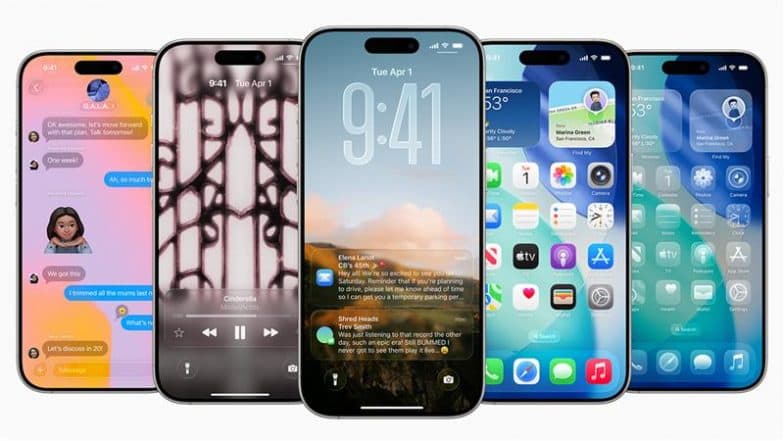
Cupertino, November 4: Apple has released its latest iOS 26.1 update offering a few new features and improvements. The iOS 26.1 update is available on eligible iPhones and brings new improvements in Apple Intelligence and adjustments in the Liquid Glass interface. The iOS 26 brought several new updates to the table, including major improvements along with the Liquid Glass interface. The latest iOS update carries on the previous features and adds a few more details.
Apple iOS 26.1 update includes various improvements in Liquid Glass UI, live translation with Apple Intelligence, Apple Music swipe gesture support, Lock Screen Swipe disable option, new control for audio recording and much more. This is the highly anticipated update that Apple users have been waiting for since the launch of iOS 26. WhatsApp New Feature Update: Meta-Owned Platform Developing New Feature To Allow Users Call Using Their Username After Rolling Out Chat Themes on macOS.
Apple iOS 26.1 Update; List of Eligible iPhones
- iPhone 17
- iPhone 17 Pro
- iPhone 17 Pro Max
- iPhone Air
- iPhone 16
- iPhone 16 Plus
- iPhone 16 Pro
- iPhone 16 Pro Max
- iPhone 16e
- iPhone 15
- iPhone 15 Plus
- iPhone 15 Pro
- iPhone 15 Pro Max
- iPhone 14
- iPhone 14 Plus
- iPhone 14 Pro
- iPhone 14 Pro Max
- iPhone 13
- iPhone 13 mini
- iPhone 13 Pro
- iPhone 13 Pro Max
- iPhone 12
- iPhone 12 mini
- iPhone 12 Pro
- iPhone 12 Pro Max
- iPhone 11
- iPhone 11 Pro
- iPhone 11 Pro Max
- iPhone SE (2nd generation and later)
iOS 26.1 Update; New Features, Improvements and More
- iOS 26.1 update has introduced new languages in AirPod's Live Translation, expanding Apple Intelligence. It now supports Italian, Mandarin, Korean and Japanese.
- Apple Music now lets the users to swipe and go to the next or previous tracks.
- Apple has introduced new option for recording audio using external USB microphones, offering new Local Capture option in Settings to select the location of audio file storage.
- Liquid Glass UI also received a much awaited feature, letting the users choose between the Clear interface and a new Tint mode. It also allows users to set opacity of apps and Lock Screen notifications.
- The devices also get new security update toggle that quietly installs small security fixes in the background. Users need to tap on 'Install Now'.
- Now, the users can swipe and turn off alarm.
- The iOS 26.1 update now allows the users disable Lock Screen swipe-to-camera gesture to avoid accidental touches.
- FaceTime audio is improved on weak connections.
- New Apple TV app design is launched.
- Manual workout logging now enabled in the Fitness app.
How to Download iOS 26.1 Update on iPhone?
To download the Apple iOS 26.1 update on your iPhone, please follow the below steps. ChatGPT Go Subscription Free for 12 Months Starting From Today in India; Check Features and Know How To Activate OpenAI’s Plan.
- Open your iPhone's Settings and access General settings.
- Now, go to the 'Software Update' section.
- Your iPhone will show the option to Download if the update is available.
- Now, begin installation.
- After download is complete , you will get the option to update
- You ca choose - Immediately, Install later, or Remind Me Later.
- Then, enter your passcode to proceed if asked.
If you have not received the update, wait as the rollout may take some time to reach to your device.
(SocialLY brings you all the latest breaking news, fact checks and information from social media world, including Twitter (X), Instagram and Youtube. The above post contains publicly available embedded media, directly from the user's social media account and the views appearing in the social media post do not reflect the opinions of LatestLY.)
 Google Trends



 Live Bot